FeaturesHow it worksPricingDocsBlogFAQ
Try for free

Marketing blocks and skills for AI coding agents

Initium gives your AI agent the style, strategy, blocks and skills to generate a site that looks designed, not generated.

Try for free

In most AI apps, we tend to start from a vague prompt and hope for the best, re-rolling the same generic designs, the same filler copy, the same conventions every time.

Initium is different. You set the direction once with style, strategy and blocks and hand your agent a system instead of a guess. The result is a consistent site that looks designed and reads on-brand.

x
BadgeSecondaryOutline

Conversion lift

Style system coverage

-14%
Nav
Hero
Form
CTA
Card
Style

Decide how it looks and skip the guesswork

Set colors, fonts, radius, buttons and forms from a designer's presets, preview it live, then export a DESIGN.md your AI agent follows or install it straight into shadcn/ui.

Design your style

Offer

Audience

Competitors

Sitemap

Voice

Strategy

Tell AI what to build, not just how it looks

A guided brief that turns your business, audience and offer into context your AI agent can use, so it writes real copy and page structure instead of generic filler. Export it as STRATEGY.md and build from it.

Build your strategy
Blocks

Don't waste your time and tokens

Production-ready React sections, built with shadcn/ui and Tailwind CSS, that already match the style you set, so your agent can assemble a site instead of regenerating the same components from scratch.

Preview all blocksGet blocks
Hero section 4

Solve your user's main problem

Follow with one or two sentences that expand on your value proposition and focus on key benefits.

Sign up
Hero section visual
DESIGN.md
STRATEGY.md
SKILL.md
Blocks
Skills

Make your agent use all this more effectively

Skills are instructions that teach your AI agent how to work with your style, strategy and blocks, so it builds the way you would instead of guessing. They turn a pile of files into a process the agent follows.

Get skills
How it works

Don't start with blank prompts. Build a site that looks designed

Choose the direction, equip your AI agent with the right assets, and build from a system that already understands your style and strategy.

01. Plan

Set your style and strategy in the editor, then export it. You decide how it looks and what AI should build.

02. Equip

Add the blocks and skills, so your agent has real components and a process to follow.

03. Build

Use everything in the AI agent of your choice and get a site that is well-planned and designed.

Preview simple pages built with Initium

These pages were built with entirely with Initium styles, strategy, blocks and skills. Some sections and elements were modified to fit the page content.
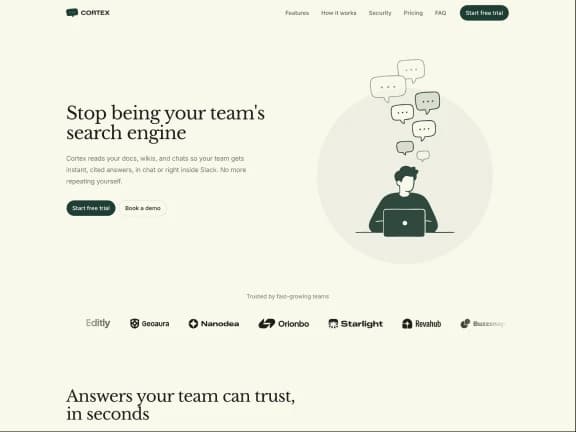

Cortex template previewLumen template preview
Pricing

Plan for free. Pay once to build.

$100 off + lifetime access for the first 100 customers
(58 left · updated once a day).

Free

Everything you need to plan.

$0
Get started

Use Style and Strategy for free

What's included:

Full Style editor, export DESIGN.md
Full Strategy builder, export STRATEGY.md
Preview every block
24 free blocks, the first in every category

Pro

Everything in Free, plus the tools to build.

$199$299
Get lifetime access

One time purchase · The early bird offer ends soon

Everything in Free, plus:

210+ Pro Blocks
Agent skills
Production-ready TypeScript code
All future blocks and skills included
Works with Cursor, Claude Code, Codex, v0, and more
Commercial license, unlimited projects
Free updates

Created by Matt Wierzbicki · My tools are used by 15,000+ creators and teams at

"Excellent approach and so well put together. You took presets to another level. I really liked that you did this for marketing pages."
shadcn•Creator of shadcn/ui on Initium app
FAQ

Frequently asked questions

Learn more about how Initium works and what you get. Can't find what you're looking for? Contact Matt

Product

Access

What is Initium?
Initium is a shadcn-compatible registry of marketing blocks and agent skills. It gives AI coding agents like Cursor, Claude Code, and Codex production-ready React sections built with shadcn/ui and Tailwind CSS, plus DESIGN.md, STRATEGY.md, and SKILL.md files that teach the agent your style presets, copy rules, and section rhythm. Blocks install with the shadcn CLI into any Next.js project, so you own the code. Styles, presets, strategy files, and 24 free blocks are free; Pro is a one-time $199 license with 210+ blocks and lifetime access to a growing library.
What can I control in Style?
Style gives you curated presets and the full Tailwind color system, so brand decisions take minutes instead of a token-burning back-and-forth. You can set heading and body fonts from Google Fonts with contrast warnings built in, then export Design.md or install the style directly with the shadcn/ui CLI.
What does Strategy help with?
Strategy walks you through focused prompts on audience, proof, offer and conversion goals, the same questions a designer asks before a single section exists. It helps your agent write sharper copy, clearer CTAs and FAQs based on real customer doubts, then export Strategy.md once and reuse it across every page and tool.
What is included in Blocks?
Blocks gives you full landing-page coverage with 20+ variants on big patterns like heroes and headers, so there is a real layout to pick instead of a blank section. Every block inherits your Style settings, ships as copy-paste TypeScript for any Next.js and shadcn project, and the library keeps growing with future blocks included.
How do Skills help my AI agent?
Skills turn your Style, Strategy, and Blocks into clear instructions your AI agent can follow. Instead of guessing the design, copy, or structure from scratch, it knows how to plan the page, write on-brand copy, use your blocks, and create new sections that still feel like they belong.
Are the blocks compatible with Radix and Base UI?
Yes. Blocks are built on Base UI, the foundation shadcn/ui is moving to, and install with the shadcn CLI like any other component. If your project is still on a Radix-based style, you automatically receive the Radix build of the library instead, so existing setups keep working — new blocks ship for Base UI.
Why do I need blocks and skills if AI can already generate everything?
AI can generate anything, but it regenerates the same sections from scratch every time and they come out off-style. Blocks give it production-ready components that already match your design, and skills teach it to build the way you would, so you stop paying in tokens and tweaking time for work you've already done once.
Is it worth $199?
It's one payment, for life, versus the monthly fees of tools like Webflow or Framer that never stop. If Initium saves you the setup and cleanup on even one project, it's paid for itself. And the block library keeps growing at no extra cost.
Do I have to be technical to use this?
No. The Style and Strategy editors are visual and guided, and the blocks are working code your AI agent assembles for you. If you can describe what you want, your agent and Initium do the building.
Will it work with my AI tool?
Yes. It works with Cursor, Claude Code, Codex, v0, Lovable, Replit, Windsurf, and others. We recommend using Cursor, Claude Code or Codex with the Initium agent for best results.
What happens after I purchase?
After the purchase you will receive an email with the license key and instructions you paste to your agent. Then you follow the agent's instructions to build the project with Initium.
How can I access my purchase?
You can access your purchase in the Polar portal at polar.sh/shadcndesign/portal by logging in with the email you used to purchase the product. The license key is in the Overview section.
Can I get a refund?
All sales are final, which is why you can preview every block and use the full editor for free before you buy. You'll know exactly what you're getting first.

Plan it once. Build it right.

Stop handing AI a blank prompt. Give it your style, strategy and blocks, and let it build a site that looks designed, not generated.

Get lifetime access

Copyright © 2026 Matt Wierzbicki

Product

  • Features
  • Pricing
  • Style editor
  • Blocks browser

Resources

  • Docs
  • Blog
  • Changelog
  • FAQ

Legal

  • Privacy Policy
  • Terms of Service
  • License Agreement